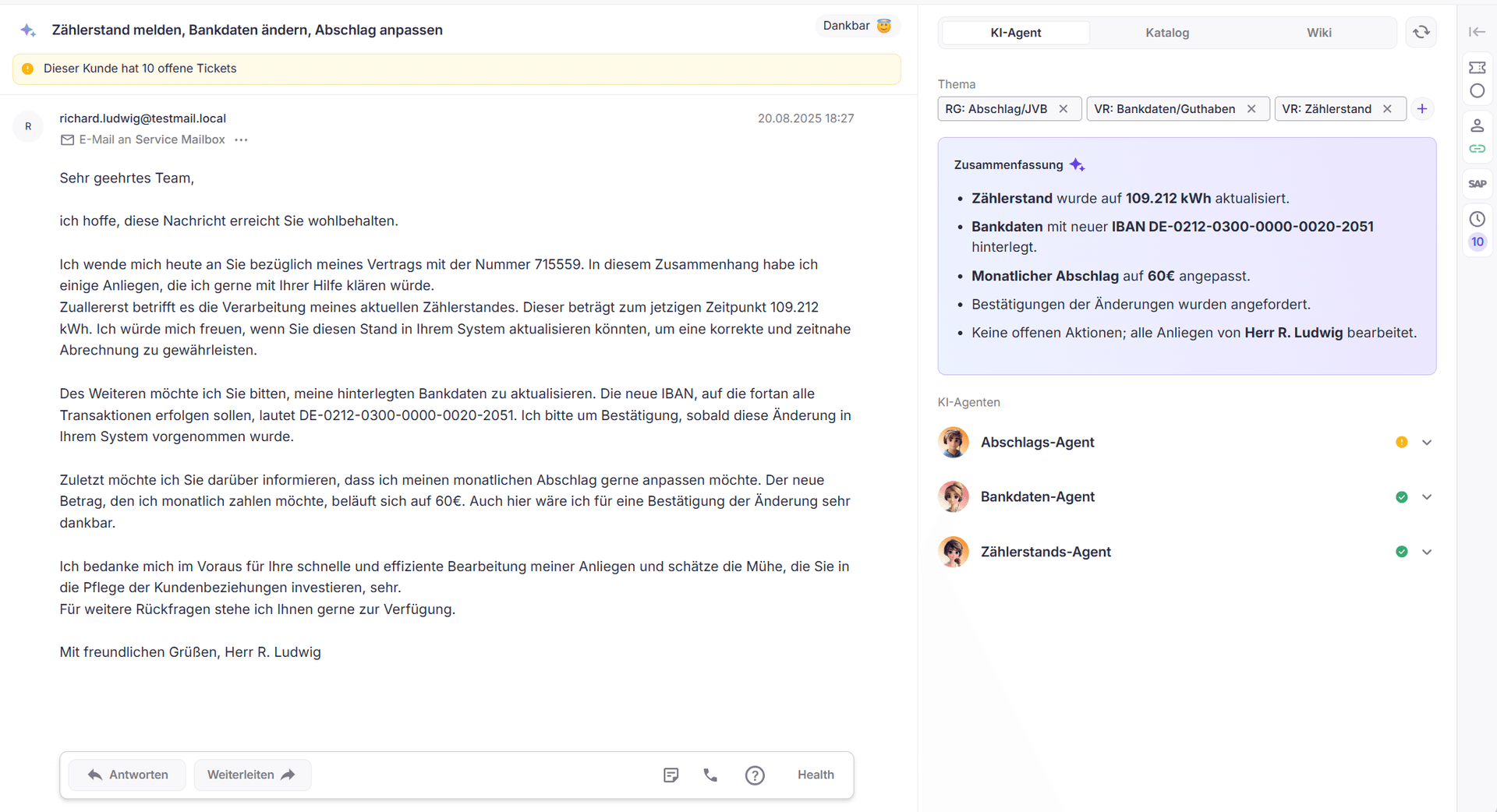
The left area displays the actual customer request and all information relevant to the substantive understanding of the ticket.
AI-supported classification
Directly in the context of the concern, an automatically generated summary is displayed. In addition, the AI assesses the mood of the customer, visualized by an emoji, to allow a quick assessment.
Hints in the processing context
Context-dependent notes or system-side information are displayed as banners, for example in case of special abnormalities or dependencies in the ticket.
Basic ticket information
The most important metadata is clearly displayed below the content, including subject, sender, recipient, and sending date.
Interaction with the customer request
The classical processing functions are available in the upper area, for example:
Reply
Forward
Record internal notes directly on the ticket
The middle area supports the active processing of the ticket and combines AI agents, templates, and knowledge sources.
Summary
The AI-generated summary includes the most important information of a ticket in condensed form. It summarizes relevant ticket contents, matching wiki articles, and other background information so that processors can quickly get a comprehensible overview of the current facts without having to check all contents individually.
AI Agent
Subject and tags define the professional classification of the ticket and influence the further distribution in the autopilot.
If a request can be processed by an AI agent, it is shown directly below the subjects and can be applied immediately.
If the proposed AI agents are deemed inappropriate, they can be removed via "Concern incorrectly recognized?".
Not every request is suitable for complete automation. In such cases, an AI-generated response proposal is offered, which can be taken over into the response field by click and supplemented manually.
Catalog
In the catalog, if configured, text templates (templates) are available. Navigation takes place via the stored structure or via the search field.
Tip
The search for a suitable template often takes longer than to formulate a short bullet-point answer and have it elaborated by the AI text assistant.
Wiki
The wiki area allows direct access to instructions and background information. Navigation occurs either via the structure or via the search field.
For specific questions, Neo automatically summarizes the relevant content from matching articles. This saves time and provides a quick, clear answer without having to read individual articles.
The right area bundles context-related information about the ticket and the customer. The sidebar can be fully expanded or targeted via the icons.
Ticket details
Here you can find all information about the current ticket, including:
Status and Due Date
The status describes the processing state of a ticket: "open", "waiting", or "closed", whereas "waiting" is always temporarily limited and associated with a due date.
The due date determines by when a ticket should be processed and thus controls the further processing flow.
When creating the ticket, the status is initially "open". The due date is automatically set based on the respective tag configuration.
Note
If the status of a ticket is manually set to "waiting", the specification of a due date is required.
After the expiry of this date, the status automatically changes back to "open" and the ticket is offered again for processing.
In this way, status and due date interlock and ensure that waiting tickets return controlled to the processing process.
Agent
If tickets are assigned to a specific agent, they are only offered to this agent in autopilot.
An exception is longer absence.
Further information
ID, priority, and - optionally - the activity log
Customer data
This section shows the most important master data of linked customers. The displayed information can be individually expanded, for example:
Contract and customer number
Tariff, monthly down payment, and consumption
possibly credit or open amounts
Delivery address, e-mail, and delivery status
History
The history lists all further tickets of the customer including status, receipt date, and topic.
Depending on the configuration, relevant system events are also displayed, such as tariff changes or price changes.
If no customer is linked with the ticket, all tickets available to the sender address are listed.